How to keep your API reference in sync with code
Generate your OpenAPI document from code, validate it in GitHub Actions, and fail pull requests when the committed API reference is stale.
- Written by
- Arun Bhalla (opens in a new tab)
- Published on
- Read time
- 9 min

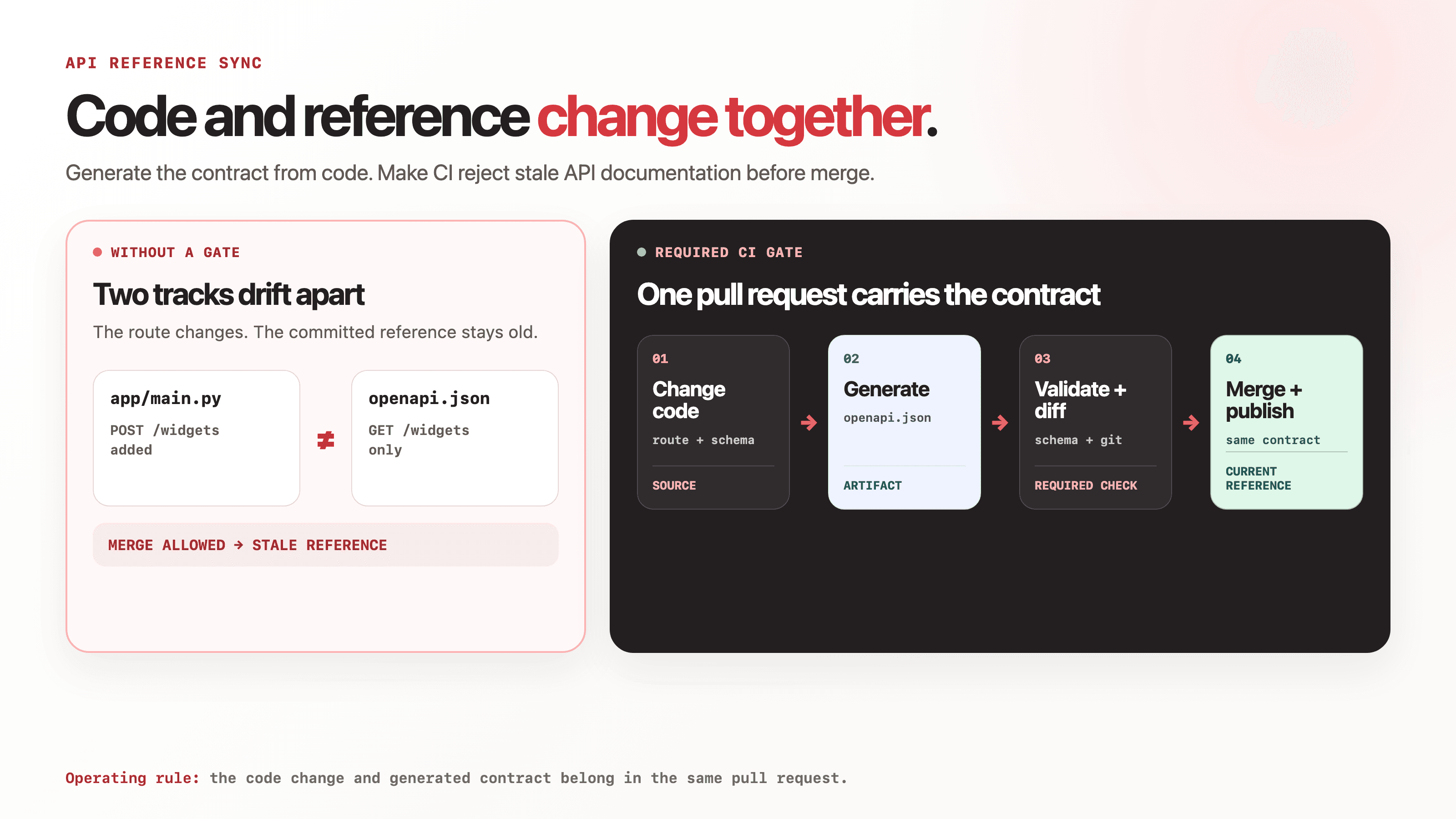
Your API reference should be generated from the same source that defines the API, checked in every pull request, and published from one versioned OpenAPI document.
For a code-first API, the practical loop is:
- Generate the OpenAPI document from the application.
- Validate the generated document.
- Compare it with the version committed to the repository.
- Fail the pull request if they differ.
- Build or update the published reference from that committed document after merge.
When an endpoint changes without a new openapi.json, the pull request fails before merge. The engineer updates the contract in the same pull request as the route, parameter, schema, or response.
The example below uses FastAPI and GitHub Actions, but the pattern works with any framework that can export a deterministic OpenAPI document. OpenAPI descriptions can feed documentation renderers, code generators, and testing tools, so the generated document can sit between the implementation and several downstream outputs.
What this workflow does and does not cover
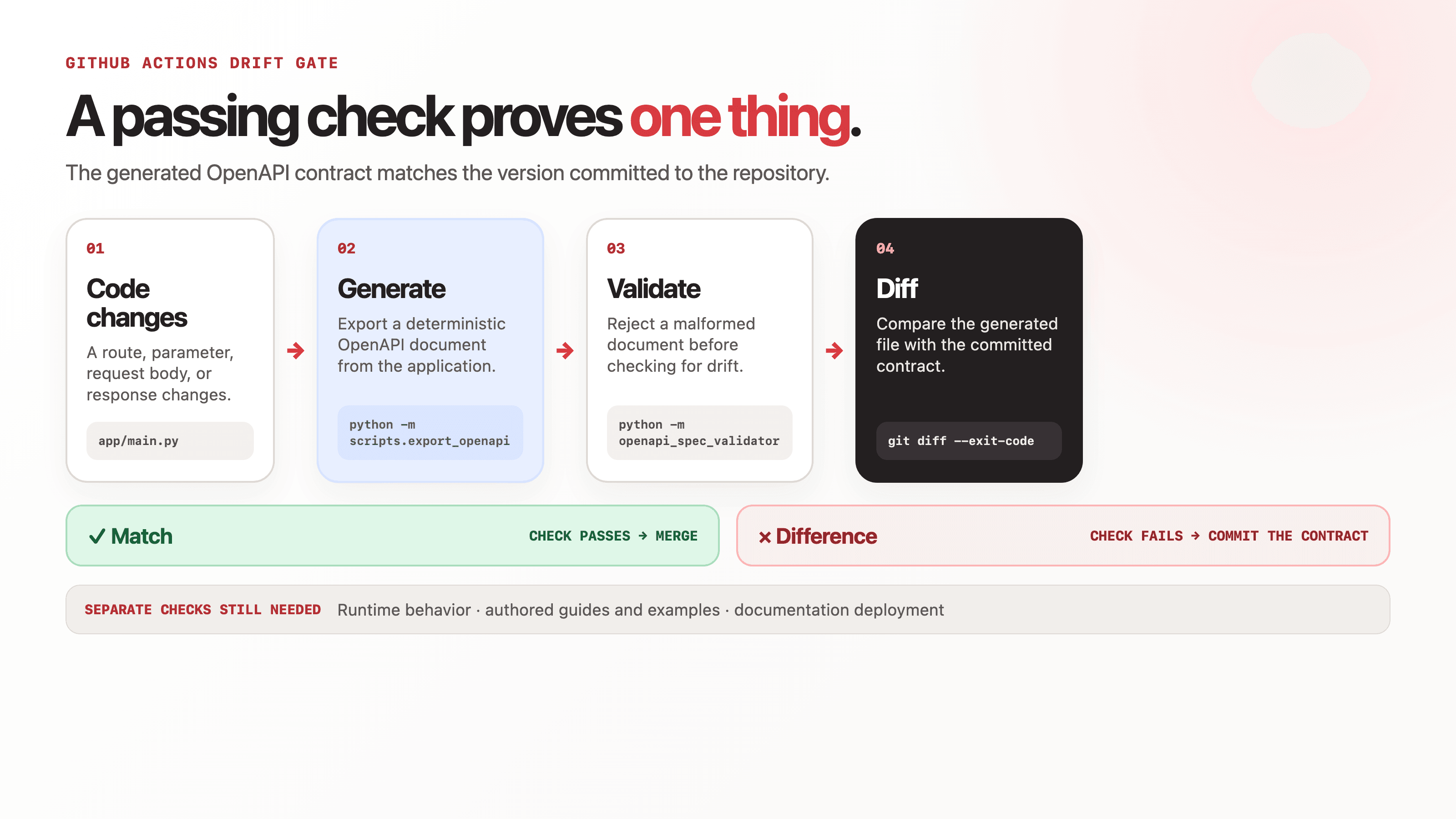
This workflow keeps the structured API reference aligned with declarations in your code. It catches a route added to FastAPI without a matching update to the committed openapi.json, for example.
It does not prove that the running service behaves exactly as the schema says. It also does not update authored material such as authentication guides, migration notes, or SDK examples. Those need runtime contract tests and a documentation review process of their own.
Treat this CI check as the mechanical baseline. It guarantees one narrow thing: the generated reference artifact matches what the framework declares. It does not guarantee complete documentation.
Prerequisites
You need:
- A code-first API that can generate an OpenAPI document.
- An API reference renderer or docs platform that reads OpenAPI JSON or YAML.
- A repository hosted on GitHub.
- A repeatable dependency install, preferably from a lockfile or pinned requirements file.
- Permission to add a workflow under
.github/workflows/and make its check required.
This example assumes:
- Python 3.11 in CI.
- FastAPI exposes the application as
appinapp/main.py. - The committed OpenAPI document lives at
openapi/openapi.json. - Your documentation build reads that exact file.
FastAPI application instances expose an .openapi() method that returns the generated schema. FastAPI builds that schema from the application's registered routes and caches the result on the application object.
Step 1: add a deterministic OpenAPI export command
Create scripts/export_openapi.py:
import json
from pathlib import Path

from app.main import app

output = Path("openapi/openapi.json")
output.parent.mkdir(parents=True, exist_ok=True)
output.write_text(
    json.dumps(app.openapi(), indent=2, sort_keys=True) + "\n",
    encoding="utf-8",
)
print(f"Wrote {output}")
Run it from the repository root:
python -m scripts.export_openapiUsing python -m matters. Calling python scripts/export_openapi.py can put scripts/, rather than the repository root, at the front of Python's import path. In that setup, from app.main import app may fail in CI even though the application imports normally elsewhere.
The exporter sorts object keys and adds one trailing newline. Those small choices keep the output stable so reviewers see contract changes rather than formatting churn.
Commit the generated file:
git add scripts/export_openapi.py openapi/openapi.json
git commit -m "Add deterministic OpenAPI export"
Your API reference renderer should now read openapi/openapi.json. If the docs site reads another copy, another branch, or a live endpoint generated separately, the CI check and the published reference can still disagree.
Step 2: install a schema validator
Add the application and validation dependencies to your normal dependency-management system. A minimal pinned example is:
fastapi==0.141.1
openapi-spec-validator==0.9.0
FastAPI 0.141.1 and openapi-spec-validator 0.9.0 were the current PyPI releases on September 23, 2026. These versions make the sample reproducible. They are not a recommendation to replace versions already approved in your repository. Use your lockfile when you have one, and refresh this snippet before publication.
openapi-spec-validator can validate a file through python -m openapi_spec_validator <file> and can detect the OpenAPI version from the document.
Test the complete local command sequence:
python -m pip install -r requirements-dev.txt
python -m scripts.export_openapi
python -m openapi_spec_validator openapi/openapi.json
git diff --exit-code -- openapi/openapi.json
The last command exits successfully only when the generated document matches the committed copy.
Step 3: add the GitHub Actions workflow
Create .github/workflows/api-reference-sync.yml:
name: API reference sync

on:
  pull_request:
  push:
    branches:
      - main

permissions:
  contents: read

concurrency:
  group: api-reference-${{ github.ref }}
  cancel-in-progress: true

jobs:
  check-openapi:
    runs-on: ubuntu-latest

    steps:
      - name: Check out the repository
        uses: actions/checkout@v7

      - name: Set up Python
        uses: actions/setup-python@v7
        with:
          python-version: "3.11"
          cache: pip
          cache-dependency-path: requirements-dev.txt

      - name: Install dependencies
        run: python -m pip install -r requirements-dev.txt

      - name: Generate the OpenAPI document
        run: python -m scripts.export_openapi

      - name: Validate the OpenAPI document
        run: python -m openapi_spec_validator openapi/openapi.json

      - name: Fail if the committed document is stale
        run: git diff --exit-code -- openapi/openapi.json
GitHub requires workflow YAML files to live in .github/workflows/. The pull_request and push events used here are standard workflow triggers. GitHub recommends setup-python rather than relying on the runner's default Python because the default can vary between runner images.
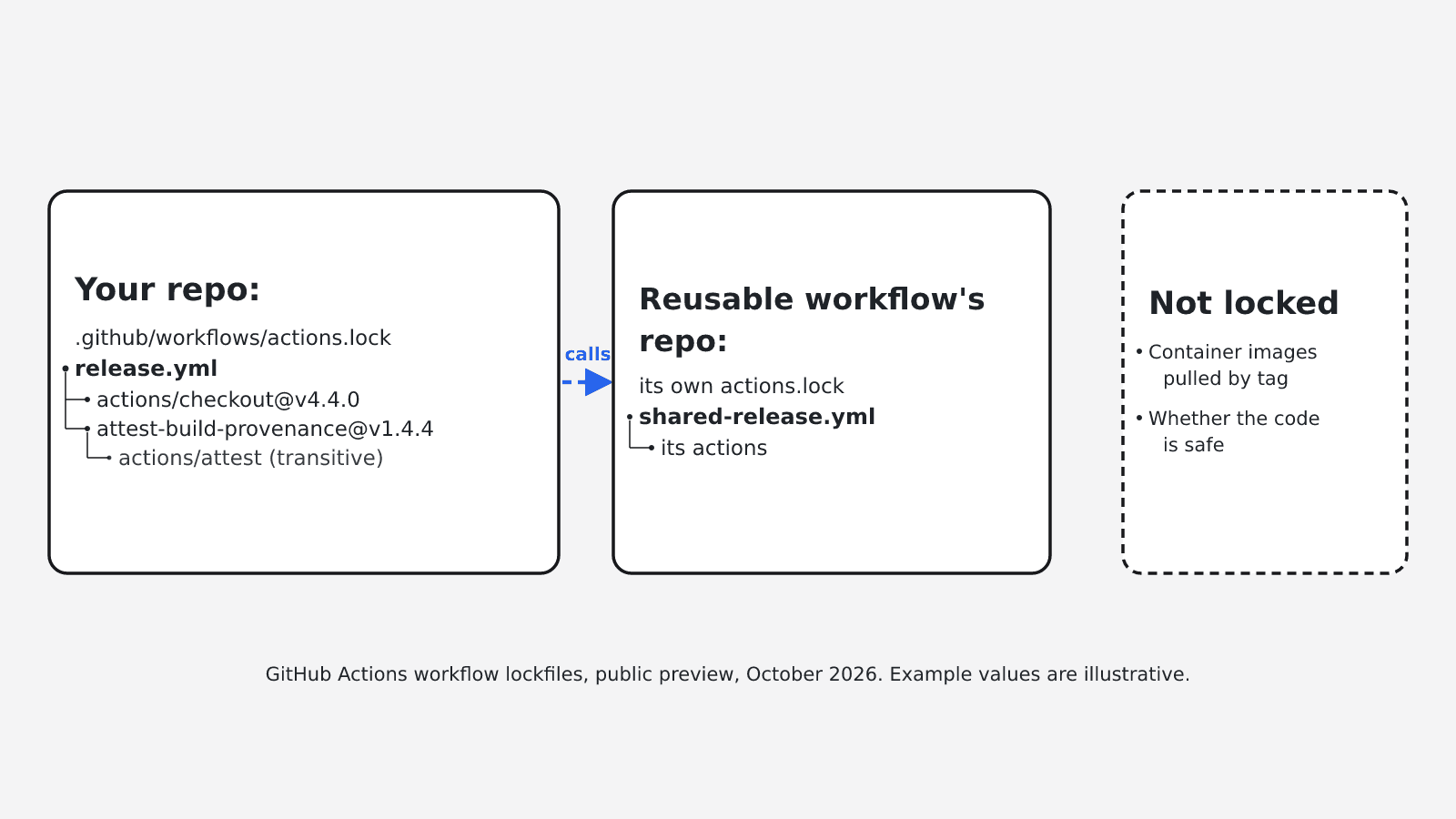
The current major releases are v7 for both actions/checkout and actions/setup-python as of September 23, 2026. The example uses major-version action tags to stay readable. For a production repository, follow your organization's supply-chain policy. GitHub's own guidance recommends pinning actions to full commit SHAs when immutability is required.
This job requests read-only repository contents and uses no secrets. Keep it that way unless the generator needs a private package registry. Generating a schema should not require production credentials or a live database connection.
Step 4: make the check part of the pull-request contract
Run the workflow once, then add check-openapi as a required status check in the branch protection rules for main.
Only a required status check blocks the stale file from merging. An optional job reports the problem and lets it through.
Give contributors one repair command in CONTRIBUTING.md:
python -m scripts.export_openapiThe expected developer loop is:
# Change the API code.
python -m scripts.export_openapi
python -m openapi_spec_validator openapi/openapi.json
git add app/ openapi/openapi.json
git commit -m "Add widget creation endpoint"
The OpenAPI diff now appears in the same pull request as the implementation. A reviewer can see that a new endpoint was added, a field became required, or a response schema changed without opening the rendered docs site.
Step 5: publish the same artifact
The CI check prevents the committed document from falling behind the code. The remaining risk sits in the documentation deployment.
Configure the API reference to build from openapi/openapi.json after a merge to main. Depending on your docs stack, that may mean:
- Importing the file during a static-site build.
- Uploading the file to your documentation platform in its deployment job.
- Serving the versioned file from a stable URL that the reference renderer reads.
Do not generate a second OpenAPI document inside the docs deployment with a different command or dependency set. That creates two sources of truth again.
For a separate documentation repository, publish the generated document as a versioned artifact or open a bot pull request against the docs repository. Preserve the source commit SHA in the handoff so the team can trace a published contract back to the code that produced it.
What to expect in GitHub
Once the workflow is required, pull requests should behave like this:
- A change outside the API produces the same OpenAPI file, so the check passes.
- An API change without a regenerated file produces a diff and fails at
Fail if the committed document is stale. - An API change with the updated file committed passes the drift check.
- A malformed OpenAPI document fails during validation before Git compares files.
- A merged change triggers the same safety check on
main. Your docs deployment then rebuilds from the committed document.
The failing git diff is the repair instruction. It shows the exact generated contract change, so the contributor can review it, rerun the exporter, and add the file to the existing pull request.
Troubleshooting
ModuleNotFoundError: No module named 'app'
Run the exporter as a module from the repository root:
python -m scripts.export_openapiIf the API lives in a subdirectory, set working-directory on the relevant workflow steps or install the application package before export. Avoid editing PYTHONPATH in CI unless that is also how developers run the application locally.
The generated file changes on every run
Look for timestamps, random IDs, environment-specific server URLs, unordered collections, or metadata read from the current machine. Remove volatile values from the generated document or pass stable build-time values.
Do not hide noisy output with git diff --ignore-all-space. Make generation deterministic instead.
The check passes locally but fails in GitHub Actions
Match the CI runtime locally. Compare:
- Python versions.
- Locked dependency versions.
- Environment variables used during application import.
- The working directory.
- Optional routes enabled only in one environment.
A generator that imports the whole application can also trigger database connections, secret lookups, or plugin discovery. Refactor application startup so schema generation can run without production infrastructure.
Validation passes, but the API still behaves differently
Schema validation checks the document's structure. It does not send requests to the service or prove that actual responses match the schema.
Add contract or integration tests for high-risk endpoints. Keep the generation check because it solves a different problem: whether the committed reference artifact matches what the framework declares.
The OpenAPI file updates, but the published reference stays old
Confirm that the renderer reads the same path and branch checked by CI. Then inspect the docs deployment trigger, build logs, artifact upload, and caching layer.
A green sync check says the repository is internally consistent. It does not say a separate publishing pipeline completed.
The reference is current, but guides and examples are stale
Generated references cover fields the framework knows about. They do not know why an authentication flow changed, which migration path customers should follow, or whether a quickstart still teaches the right sequence.
Review authored pages when the contract changes. EkLine's Docs Agent can take code or pull-request context, prepare documentation updates, and route them through a pull request for review. That complements the deterministic OpenAPI gate rather than replacing it.
The workflow is slow in a monorepo
Start by measuring the job. If it is materially slowing unrelated pull requests, add path filters for the API package, generator, dependency files, and workflow itself.
Be careful with filters. Missing one shared model or dependency path creates a silent hole in the guardrail. A slightly broader trigger is safer than a fast check that skips relevant changes.
The operating rule
Code and its generated contract must change together. The published reference must consume that exact contract.
Run the workflow against one recent API pull request before making it required. Confirm that it passes unchanged code, fails on a deliberate route change, and produces a readable diff. Then connect the committed document to the docs deployment.
If your OpenAPI reference stays current but the surrounding guides still lag behind releases, see how EkLine updates documentation from code changes and sends the result through review.
Sources
- OpenAPI Specification
- FastAPI: Extending OpenAPI
- GitHub Docs: Building and testing Python
- GitHub Actions workflow syntax
- openapi-spec-validator CLI
- EkLine: Update and review documentation
- EkLine: Generate documentation from GitHub pull requests
- actions/checkout latest release
- actions/setup-python latest release
- FastAPI on PyPI
- openapi-spec-validator on PyPI