AI Knowledge Base Software for Customer-Facing Docs
Learn how to evaluate AI knowledge base software that finds missing answers, fixes stale customer-facing docs, preserves review control, and serves current product knowledge to AI tools.
- Written by
- Puneet Arora (opens in a new tab)
- Published on
- Read time
- 14 min

AI knowledge base software should keep the source accurate before it generates another answer from it.
EkLine turns recurring support questions and product changes into reviewable updates for customer-facing docs. It finds missing and outdated knowledge, prepares the article or correction, and keeps publication under your team's control. The approved knowledge can then support customers, support teams, and MCP-compatible AI tools.
TL;DR
- Most AI knowledge base products help teams draft articles, search existing content, or answer questions. Customer-facing docs also need a maintenance workflow that catches gaps and drift after launch.
- Support conversations show which answers customers cannot find. Product changes show which published answers are about to become wrong.
- A useful system classifies each signal before writing: missing article, outdated article, already covered, or unsuitable for public documentation.
- Support leaders should evaluate ticket-to-article workflow, privacy controls, review effort, and whether repeat questions fall after publication.
- Product leaders should evaluate change detection, source traceability, ownership, terminology control, and how the system fits the current help center and docs stack.
- EkLine is a knowledge maintenance layer. It works with customer-facing documentation workflows rather than replacing the help desk or documentation host.
What is AI knowledge base software?
AI knowledge base software uses AI to create, maintain, retrieve, or distribute the information that customers and support teams use to solve problems.
That broad label covers several different jobs:
- Writing a first draft from a prompt or conversation
- Searching articles and returning a relevant passage
- Powering a support bot or AI agent
- Organizing and publishing help center content
- Finding missing or stale knowledge
- Updating the source when the product changes
- Making approved knowledge available to external AI tools
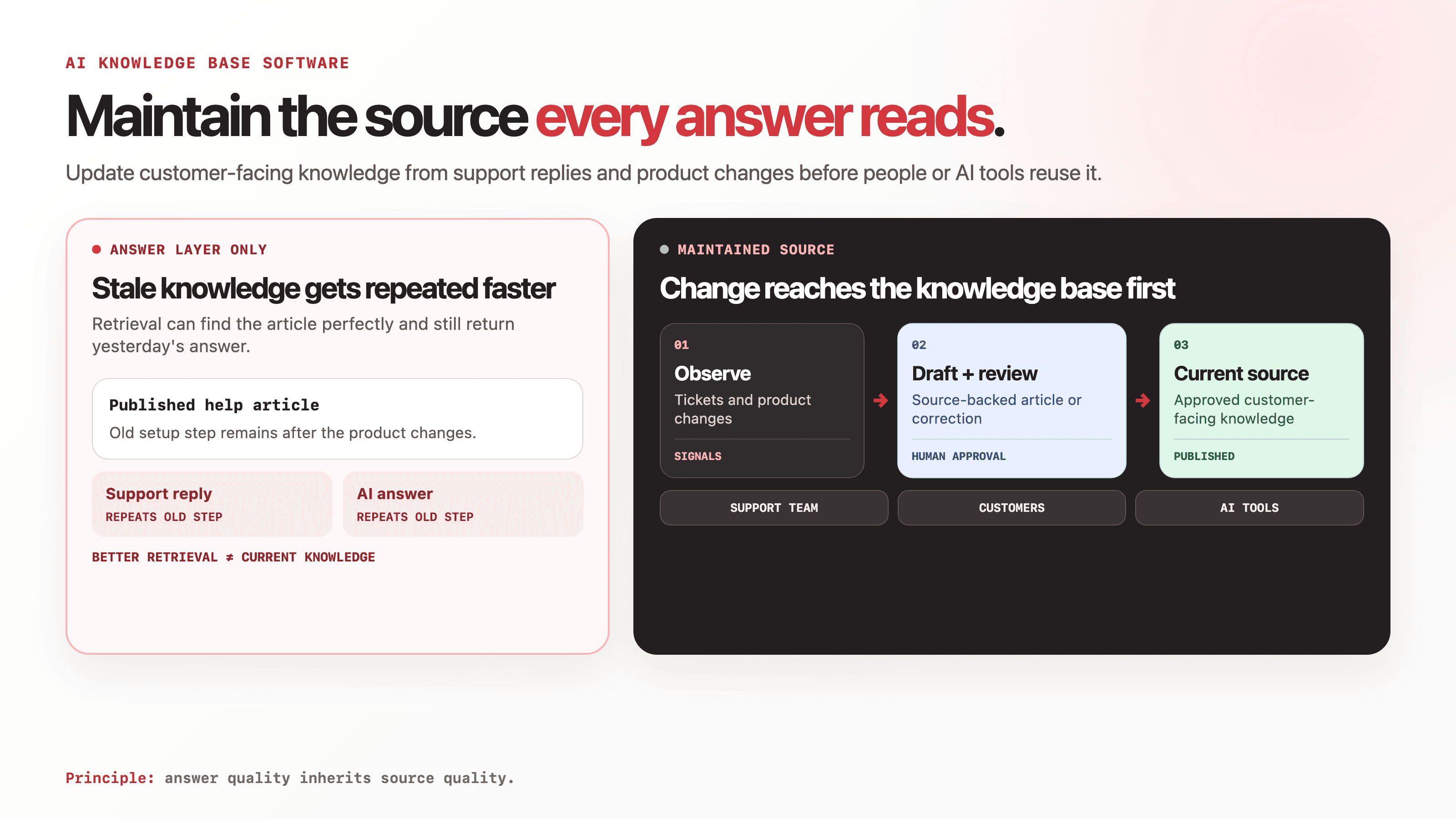
These jobs are related, but they are not interchangeable. A chatbot can retrieve a stale article perfectly and still give the wrong answer. An article generator can create more content without noticing that three existing pages now contradict each other. A help center can publish quickly while remaining disconnected from the releases and support conversations that change product truth.
Customer-facing documentation needs the whole maintenance loop: detect the gap, identify the right source, prepare the change, review it, publish it, and measure whether the question returns.
Customer-facing knowledge breaks in two directions
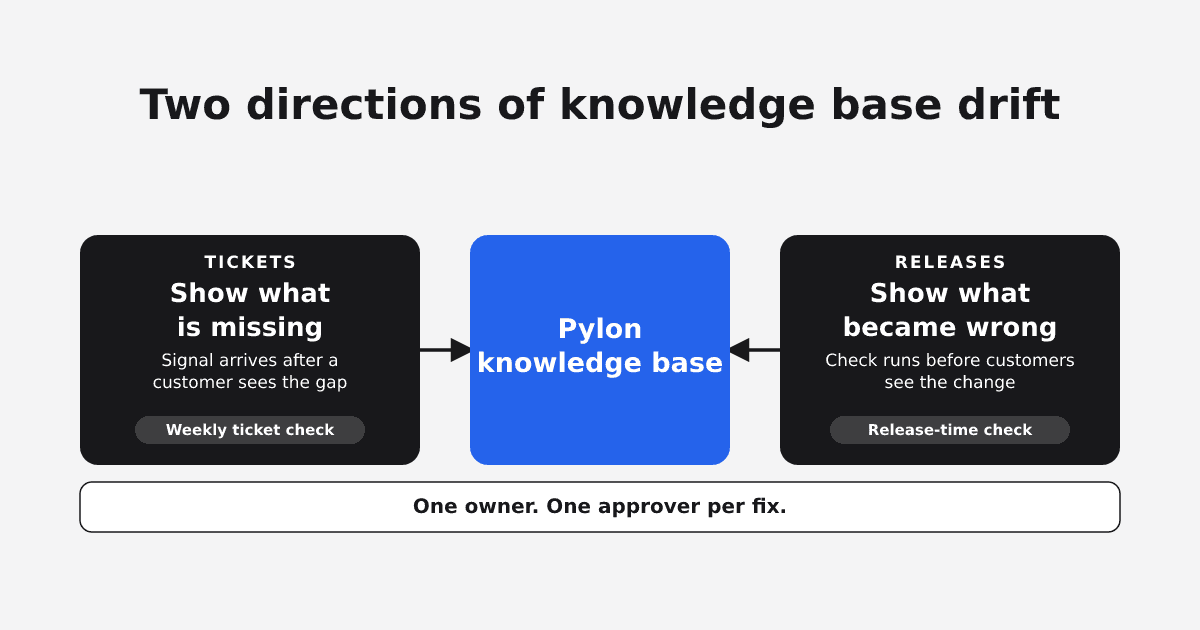
Support leaders and product leaders usually encounter the same problem from opposite sides.
Support sees knowledge that never became documentation. The answer exists in a ticket, Slack thread, escalation, or customer call. The team keeps solving the same problem one conversation at a time.
Product sees documentation that stopped matching the product. A release changed the workflow, a setting moved, an API response changed, or marketing approved a new term. The article still describes yesterday's behavior.
| Signal | What happened | What the knowledge base needs | Likely owner |
|---|---|---|---|
| The same question appears in several tickets | Customers cannot find a complete answer | A new article or a stronger existing answer | Support or customer success |
| A support reply corrects a published article | The current page is incomplete or wrong | A targeted correction with the resolved case as evidence | Support plus product |
| A product change affects a documented workflow | The page will drift unless it changes with the release | An update tied to the product change | Product or engineering |
| A terminology decision changes how the feature is described | Customers see several names for one concept | A consistent update across affected pages | Product marketing or product |
| An AI tool answers from an old page | Retrieval works, but the source is stale | A source correction and a fresh evaluation | Docs, support, or product |
A system that watches only tickets reacts after customers feel the problem. A system that watches only product changes can miss the language customers use and the edge cases that surface in support. Customer-facing knowledge improves when both signal types feed the same review process.
The category includes tools that solve different jobs
The phrase "AI knowledge base software" often mixes help desks, knowledge base platforms, writing assistants, retrieval systems, and maintenance tools in one list. The right choice depends on the job that is failing.
| Approach | Best fit | What it owns | Common gap |
|---|---|---|---|
| Help desk with native AI knowledge features | Teams standardizing support operations in one suite | Ticketing, agent workflows, help center content, AI support answers | Product-change context may live in engineering and product systems outside the help desk |
| Documentation or knowledge base platform with AI | Teams choosing where to author, organize, search, and publish | Content management, navigation, permissions, publishing, retrieval | The platform may still depend on people to notice gaps and stale behavior |
| General AI writing assistant | One-off drafting, rewriting, and tone work | Text generation from the prompt and sources provided | It usually has no persistent gap detection, ownership, or publication workflow |
| Custom retrieval or support bot | Teams building a specialized answer experience | Search, retrieval, orchestration, answer generation | The bot inherits the quality and freshness of the connected source |
| Knowledge maintenance layer | Teams keeping existing customer-facing docs current across product and support change | Gap detection, drift detection, sourced drafts, review, and workflow routing | It does not replace the help desk or host the entire documentation experience |
Help desk vendors are credible choices when the company wants ticketing, a native help center, and an AI support agent in one product. Intercom describes its Knowledge product as a central source for human agents, AI agents, and self-service support. Pylon positions its knowledge base around turning support interactions into drafts for review.
EkLine is the fifth approach. It focuses on the source every answer depends on. That makes it relevant when the help desk and docs platform can stay, but the knowledge inside them is incomplete, stale, or disconnected from product change.
Five capabilities to evaluate
1. It should find the questions the knowledge base missed
Article generation begins too late if a human must first decide what to write.
Look for a system that can examine recurring support questions, compare them with current coverage, and explain why a new article or correction is needed. The output should distinguish between a real documentation gap and a billing issue, feature request, product bug, or one-off account problem.
A useful gap report answers:
- What did customers ask?
- How often did the theme appear?
- Which article should have answered it?
- Is the article missing, incomplete, or outdated?
- What evidence supports the verdict?
EkLine's support workflow starts from recurring questions and resolved conversations, then drafts a customer-facing article for review.
2. It should catch product-driven drift before the next ticket
Support data shows real friction, but it arrives after the customer has encountered the gap.
For technical products, AI knowledge base software should also read the systems where product truth changes. That may include pull requests, GitLab merge requests, Jira or Linear issues, release context, and the existing documentation itself.
The system should connect a shipped change to the pages it affects, then prepare a bounded update. It should avoid rewriting unrelated sections or treating every product change as documentation work.
3. It should reconcile sources instead of trusting the first one it finds
The complete answer often spans several systems. The issue contains the requirement, the pull request contains the shipped behavior, the support thread contains the confusing edge case, and the current article contains the structure customers already know.
An AI knowledge base workflow needs source roles and precedence. The implementation should win when it differs from an old plan. An approved pricing page should win over a stale ticket comment. A security claim should wait for the accountable owner.
EkLine can combine tickets, code changes, Slack threads, specs, and existing documentation in one drafting workflow. The reviewer can inspect the draft and ask which source supports a specific claim.
4. It should preserve review and publication control
Fluent copy is not proof that a product claim is correct.
The system should show what changed, where the evidence came from, and who must approve it. Teams should be able to accept, edit, reject, or send the draft back. Publication should follow the existing workflow rather than creating a second, hidden content process.
For Git-backed documentation, that can mean a pull request. For supported knowledge base management workflows, EkLine retrieves the live page, prepares edits in a review surface, and writes approved changes back to Confluence or Pylon through the Update KB action.
5. It should improve every answer surface that uses the knowledge
The maintained article can serve more than the help center page.
Support agents can link it instead of rewriting the answer. A support bot can retrieve it. A new employee can follow the procedure. Customers can reach the same approved product knowledge from an MCP-compatible AI tool when the documentation is exposed through a docs MCP server.
MCP standardizes how AI applications connect to servers that expose context through tools, resources, and prompts. The protocol improves access to the source. The source still needs to be current, specific, and approved.
 (opens the full-size image in a new tab)
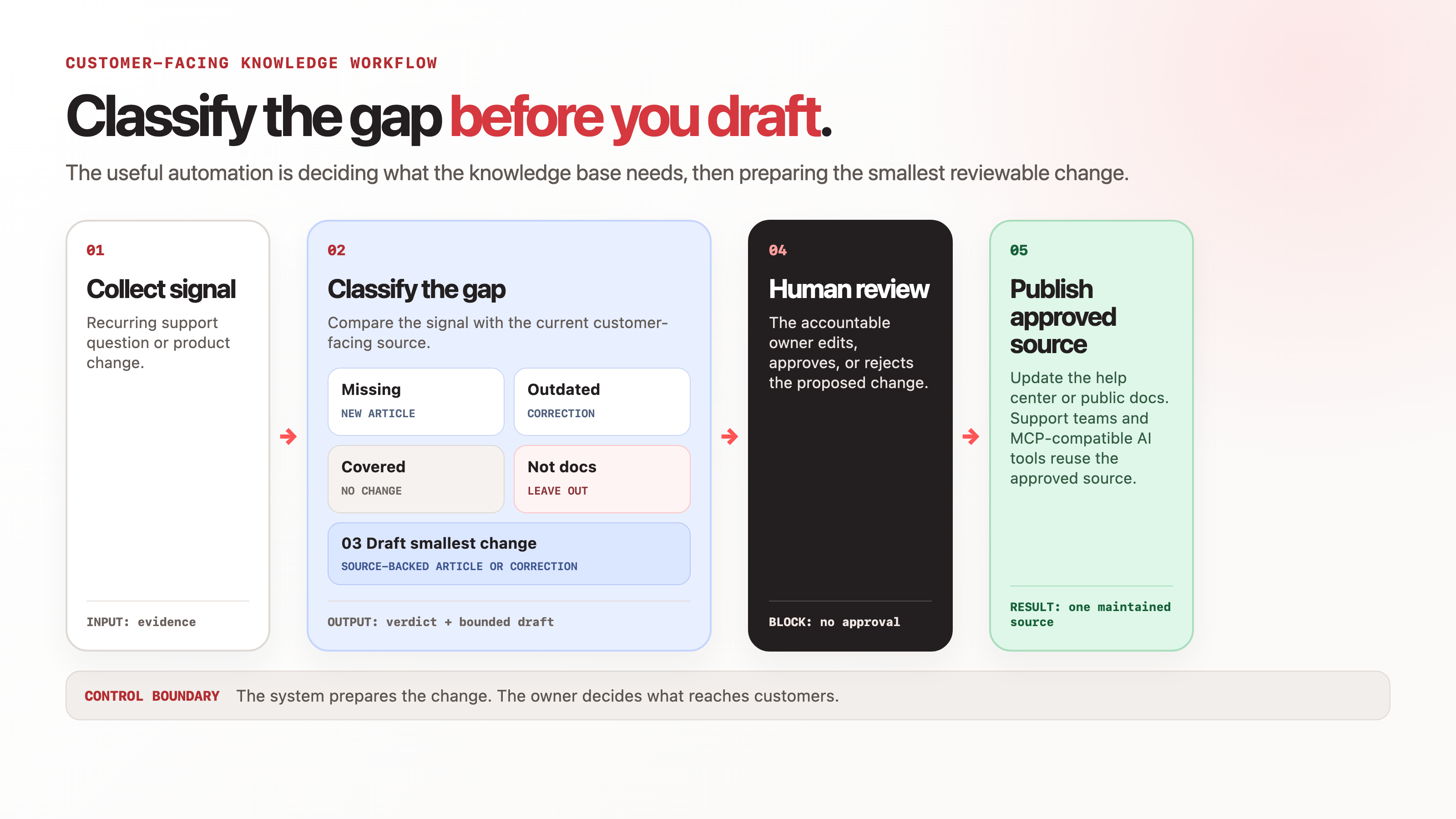
How the EkLine workflow operates
A practical customer-facing knowledge workflow has seven steps.
1. Collect the signal
Start from a recurring support question, a resolved Slack thread, a ticket, a pull request, a release, or an existing page that needs review.
2. Check current coverage
Compare the signal with the knowledge base and public documentation. The question may already have a sufficient answer. If it does, report that result instead of creating duplicate content.
3. Classify the work
Assign one verdict:
- Create a new article
- Correct an outdated article
- Complete an incomplete article
- Leave the content unchanged because coverage is sufficient
- Exclude the issue because it does not belong in public documentation
4. Assemble the evidence
Bring together the sources needed to support the draft. Give each source a role and state which one wins when they disagree.
5. Draft the smallest useful change
Create the missing article or revise the affected section. Apply the company's terminology, tone, structure, and documentation rules. Remove customer names, account details, ticket IDs, and internal-only context from public copy.
6. Review and publish
A named owner reviews the diff, product behavior, customer fit, and privacy boundary. The approved change follows the existing publication path, such as a pull request or the supported knowledge base update flow.
7. Recheck the question
After publication, test whether the article now answers the original question. Watch for repeat tickets, support-bot failures, searches with no useful result, and AI answers that still cite the old behavior.
What support and customer success leaders should evaluate
Support leaders need proof that the system reduces repeated work without turning the queue into an uncontrolled publishing pipeline.
Ask each vendor:
- Can the system group related questions across several conversations?
- Does it show the evidence behind each proposed article?
- Can it identify that an existing article already covers the issue?
- How does it remove personal and account-specific information from public drafts?
- Can a support owner review the exact change before publication?
- Does it fit the current help center and ticketing workflow?
- Can we measure whether the same question returns after the article ships?
The primary outcome is better self-service coverage. Draft volume is only a diagnostic. A team can publish many articles and still leave the highest-cost questions unanswered.
Useful measures include:
- Repeat tickets for the selected question
- Time from a resolved question to an approved article
- Percentage of proposed gaps accepted by the reviewer
- Articles reopened because the answer remained incomplete
- Support-bot or AI-answer accuracy for a fixed question set
What product leaders should evaluate
Product leaders need confidence that customer-facing knowledge will track what the product actually does.
Ask:
- Which product systems can trigger a review?
- Can the system connect a release or code change to affected articles?
- Does the draft preserve traceability to the source change?
- Can product, engineering, support, and documentation own different approvals?
- How are conflicting sources handled?
- Can terminology and product positioning be applied consistently?
- Does the system work with the current docs and help center, or does adoption require a migration?
The primary outcome is lower documentation drift after product change. The number of generated words says little about that result.
Useful measures include:
- Customer-facing pages affected per release
- Time from product change to approved documentation update
- Product claims corrected before a customer reports them
- Pages using deprecated terminology
- High-risk pages with a named owner and current evidence
Where EkLine fits
EkLine keeps customer-facing knowledge accurate, complete, and on-message for the people and AI agents that use it.
It connects support and product signals to the documentation workflow:
- Support conversations can become troubleshooting guides, FAQs, or help center articles.
- Product tickets, pull requests, release context, and existing docs can inform targeted updates.
- The system can classify a topic as missing, outdated, incomplete, covered, or unsuitable for public documentation.
- Drafts follow configured terminology and instructions.
- A human reviews the change before it reaches customers.
- Approved knowledge can remain in the current docs or knowledge base and can be made available to AI applications through MCP.
EkLine does not replace the help desk. It does not require a new documentation host. It does not make autonomous publication the default. It owns the maintenance workflow between changing product knowledge and the customer-facing source.
Run a bounded evaluation
Start with one recurring support theme and one recent product change. A four-week evaluation is enough to test the operating model without migrating the knowledge base.
| Week | Action | Output | Decision signal |
|---|---|---|---|
| 1 | Select 10 recurring questions and 10 related articles | Baseline question set and page set | Owners agree on scope and evidence |
| 2 | Connect the relevant support, product, and documentation sources | Source map and access boundary | The system can retrieve the evidence it needs |
| 3 | Review proposed gap verdicts and draft updates | Approved, edited, or rejected changes | Reviewers trust the evidence and scope |
| 4 | Re-test the questions and inspect new product changes | Pilot readout | Repeat questions, stale answers, or review time move in the right direction |
Use the smallest result that can change the buying decision. If the system finds relevant gaps, produces source-backed drafts, and fits the review path, expand to another knowledge area. If it creates low-value articles or shifts more verification work onto product and support leaders, revise the source scope before scaling.
FAQ
A help desk owns ticketing, support workflows, and often the help center or support bot. AI knowledge base software may live inside that suite or work as a separate layer. EkLine is the separate maintenance layer: it connects support and product signals to reviewable updates in the knowledge customers already use.
Yes. The stronger workflow checks whether the question is recurring, whether an article already covers it, and whether the resolved conversation contains enough evidence for a public answer before drafting.
It should. Product-aware maintenance requires access to the systems where changes are recorded, such as pull requests, merge requests, product tickets, releases, and existing documentation.
No. EkLine works with the current documentation and knowledge base workflow. Git-backed changes can move through pull requests, while supported direct knowledge base management flows write approved changes back to Confluence or Pylon.
The workflow keeps approval with the team. Reviewers inspect the changes before opening or merging a pull request or selecting Update KB for a supported knowledge base.
MCP gives AI applications a standard way to access context exposed by a server. A docs MCP server can make approved documentation available inside compatible AI tools. MCP improves access. It does not correct stale or missing content by itself.
Pick a fixed set of recurring questions and recent product changes. Measure whether the knowledge base covers them accurately, how long approved corrections take, whether the same support questions return, and whether human or AI answers use the corrected source.
See which questions your knowledge base cannot answer
EkLine can compare real support and product signals with the customer-facing knowledge you already publish, then prepare the missing or corrected articles for your team to review.
Book a demo to see the gap list built from your own knowledge base.
Sources
- EkLine: Manage a Confluence or Pylon knowledge base
- EkLine: Turn recurring support questions into a knowledge base article
- EkLine: Docs Agent integrations
- EkLine: Combine multiple sources into one document
- EkLine: Docs MCP Server
- Model Context Protocol: Architecture overview
- Intercom: Knowledge explained
- Pylon: Knowledge Base Software