How to keep ReadMe docs in sync with your code and OpenAPI spec
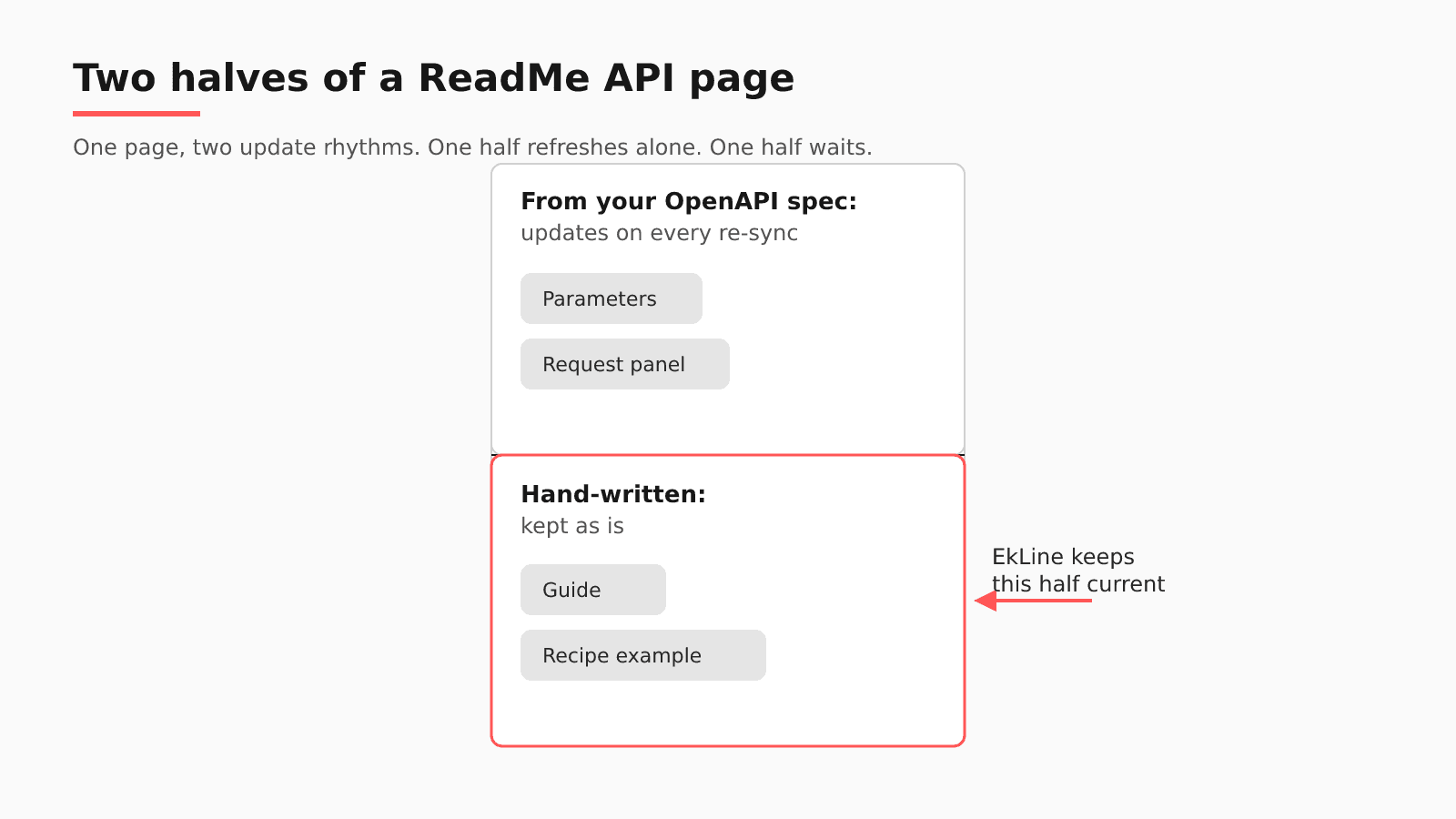
When you re-sync an OpenAPI file, ReadMe updates the spec-derived parts of each API page in place and leaves the Markdown you wrote alone. Your guides, recipes, and examples are that Markdown, so they need an update path of their own.
- Written by
- Puneet Arora (opens in a new tab)
- Published on
- Read time
- 9 min

"How do I keep ReadMe docs in sync with my code and my OpenAPI spec?" ReadMe handles half of that job. When you re-sync an OpenAPI file, ReadMe updates the spec-derived parts of each API page in place and leaves the Markdown you wrote alone. Your guides, recipes, and examples are that Markdown, so they need an update path of their own.
Follow one change: your API adds a new required request parameter. You run rdme openapi upload, and the reference page for that operation shows the parameter in an updated request panel. The getting-started guide and the recipe that call the same endpoint still show a request without it.
TL;DR
- When you re-sync the spec, ReadMe updates the reference pages and keeps your hand-written Markdown exactly as you left it.
- Use bi-directional sync or rdme for Markdown, never both, and keep every
operationIdstable. - Guides, recipes, and samples need a review step tied to code changes, which EkLine adds from GitHub or GitLab.
What ReadMe keeps current when you re-sync
Bi-directional sync connects your project to "a GitHub, GitLab, or Bitbucket repository so content stays in step whether you edit in ReadMe or in your repo," and "All content types sync, including guides, API reference pages, custom pages, recipes, and changelogs." The repository "must be empty" before you connect it, with "no commits or files," so it cannot be your existing API codebase. Your code and your docs end up in separate repositories.
rdme is "ReadMe's official command-line interface (CLI) and GitHub Action," and it "pushes one way, from your files to ReadMe, so edits made in the ReadMe editor don't flow back to your repository."
ReadMe matches pages on operationId and "updates the existing API Reference pages in place rather than creating a second set." "The parts of the page that come from the document, such as the summary, parameters, and request and response panels, update to match the new definition." The new required parameter appears on the reference page with no edit from you.
Where hand-written ReadMe pages drift
Test it on your own hub. Open the last merged pull request that added or changed a request parameter. Did anything flag the guide or recipe that calls that endpoint? Each native tool did its own job:
| Native check | What it verifies | What it does not see | Where EkLine fits |
|---|---|---|---|
| OpenAPI re-sync | Spec-derived parts of each reference page, matched on operationId | Your hand-written Markdown, which it keeps as is | Automatic PR review assesses the API pull request and can start a guide edit |
| Bi-directional sync | The repository and the hub hold the same pages | Whether a recipe's request still matches the API | Docs Agent opens its pull request in that documentation repository |
| rdme | Files in Git reach ReadMe, one way | Whether the files it pushes are still true | Docs Reviewer checks the Markdown in CI, without a ReadMe framework value |
The same re-sync page says your Markdown "is kept through every kind of re-sync." That protects your writing, and it also means no ReadMe process updates it. Three places still hold the old request:
- The getting-started guide that walks a reader through a first call.
- The recipe for that endpoint.
- Any prose or sample you added to the reference page itself, now sitting beside refreshed panels.
Third-party sync glue brings failure modes of its own. In May 2026, JohnRDOrazio found his project's old github-readme-sync action "no longer maintained" and filed "Replace broken ReadMe.io sync workflow with self-hosted docs (OntoKit pattern)." davidt99 reported that "Docs upload format are incompatible with bi-directional sync"; ReadMe closed it as not fixable. An operationId change is worse than a rename: to ReadMe, "a changed ID is a deleted endpoint plus a new one. The old page, its URL, and any edits made to it are removed."
Does the GitHub AI Writer close the gap?
For some teams, yes. ReadMe's GitHub AI Writer "Proposes documentation updates when pull requests change your codebase." When a pull request opens in a connected repository, it "analyzes the diff, identifies new endpoints that need documentation or setup steps that have changed, and drafts the update on a review branch in ReadMe." It is "Available on Pro plans and above." If your API code is on GitHub and the pull request holds everything the guide needs, it covers the example change.
Its docs describe only a GitHub integration, so GitLab code has no documented path. Its docs describe it reading the diff and describe no input from tickets, Slack threads, or specs. It starts when a pull request opens, so work that merged before you connected it waits for someone to notice.
When is ReadMe's tooling enough on its own? When the guide edit can ride in the same pull request as the code and that pull request carries every fact, as with Markdown kept beside the code and pushed by rdme. Bi-directional sync needs an empty repository when you connect it, so in practice the guides start in a repository of their own. Once facts sit there, or in a ticket, a Slack thread, or a spec, the same-PR rule leans on memory; commenters in an Ask HN thread on the topic rely on docs-first rules and nightly scripts.
A ReadMe sync checklist for this week
- Pick one path for Markdown pages. ReadMe says "If your project has Bi-Directional Sync enabled, you don't need rdme," though you still need the CLI for OpenAPI files.
- Check every synced branch's rules: "your Git provider can reject the commits ReadMe pushes to it" when protection rules or rulesets apply.
- Name branches exactly after your ReadMe versions, as ReadMe requires, so the branch a change merges into is the version it updates.
- Give every operation an explicit, stable
operationId, because a generated ID changes with the path and takes the old page with it. - When the spec changes, search your guides, recipes, and reference-page prose for the changed operation before you close the release.
How EkLine plugs into a ReadMe setup
| Part of the workflow | Where it sits |
|---|---|
| Your Markdown pages | The GitHub or GitLab repository ReadMe syncs, or the repository your CI runs rdme from. |
| What EkLine watches | Your API code. The GitHub App separates Code Repositories from Documentation Repositories, and Docs Agent also reviews GitLab merge requests. |
| Where the Docs Agent pull request lands | Your docs repository, on the branch for the ReadMe version it documents. |
| How the change reaches your hub | ReadMe's sync, or your rdme step, after your team merges. |
| CI check | Docs Reviewer checks the Markdown for style, consistency, links, and accuracy. Its framework support page lists no ReadMe value, so it works without ReadMe-specific component handling. |
| Bitbucket | Docs Reviewer only, as a Bitbucket Pipelines check. |
| What stays in ReadMe | Hosting, the editor, versions, and the reference generated from your spec. |
An engineer opens a pull request in the API repository that adds the required parameter. Automatic PR review assesses its diff, title, and description once, when it opens. A high-confidence result starts a docs pull request editing existing pages such as the guide and the recipe; a medium result posts a suggestion comment. You merge it, ReadMe's sync or your rdme step carries the guide to the hub, and the reference updates from the spec. If the review stayed silent, the weekly Docs Drift Review audits the last 30 days of GitHub activity. When the parameter came from a ticket or spec, a Docs Agent session can combine that source with the pull request. Code Sample Review "Verifies that code samples in your docs are accurate and runnable."
Can one writer keep pace with a busy API? At Socure, an identity intelligence company, one technical writer merged 348 documentation updates in seven weeks with no added headcount. The case study does not say which docs platform Socure uses.
If you are weighing a self-hosted move, Potluck Docs, EkLine's open-source Astro and Starlight template, renders OpenAPI references with Scalar and a built-in client for sending real requests.
FAQ
No. ReadMe keeps hosting your hub, generating the reference from your spec, and running sync or rdme. EkLine covers the pages ReadMe leaves to you: it reads code changes as pull requests open, sweeps merged work on a schedule, and opens pull requests against your guides and recipes for review. For a side-by-side view, read EkLine vs ReadMe.
Use one for Markdown pages. Bi-directional sync fits a team that edits in both the ReadMe editor and Git, and it needs an empty repository, branch names that match versions, and branch rules that let ReadMe push. rdme fits a team that treats Git as the only source, because it pushes one way.
Partly. Docs Agent works with GitHub and GitLab, so it does not open pull requests in a Bitbucket repository. Docs Reviewer runs as a Bitbucket Pipelines check on your Markdown.
Some teams do. In the Ask HN thread, cyanydeez described "a for loop that runs nightly on any files updated the prior day," handing the Markdown file next to each changed file to local AI to revise. With bi-directional sync, guides start in their own repository, so a recipe has no file beside the API code to pair with. Each rewrite also needs checking, which rstagi called hard: "it's hard to fact-check everything all the time." EkLine starts from the API pull request and drafts guide edits as a pull request in the repository ReadMe syncs, where a person approves them.
Take the last pull request that added a parameter to your API, and bring it to the call. To see what Docs Agent would change in your ReadMe guides after your next spec update, book a demo. Docs Agent is available to all plans, with access granted on request.
Sources
- ReadMe: OpenAPI re-syncing
- ReadMe: Bi-Directional Sync
- rdme on GitHub
- ReadMe: rdme
- ReadMe: GitHub AI Writer
- JohnRDOrazio: Replace broken ReadMe.io sync workflow with self-hosted docs (OntoKit pattern)
- davidt99: Docs upload format are incompatible with bi-directional sync
- Ask HN: How do you keep documentation up to date with AI generated code?
- EkLine: GitHub App setup
- EkLine: Changelog
- EkLine: Documentation framework support
- EkLine: Bitbucket integration
- EkLine: Automatic PR review
- EkLine: Prevent documentation drift
- EkLine: Combine sources
- EkLine: Scheduled Agents
- EkLine: Socure case study
- Potluck Docs
- EkLine vs ReadMe